Spreadsheet supercharge with AI
For a company that still runs on spreadsheets, this is the fastest way in: bring the Excel file you already have, get a real Google Sheet with AI attached to it, no migration, no new system to learn. The same sheet an agent can be pointed at to add rows from inbound email is one a person can also just ask questions of, in plain language, and get real answers and charts back.
Import what you already have, or start fresh
The Google Sheets workspace is a real integration against the Google Sheets API, not a bundled mock spreadsheet: Create, Import, Edit, Chat, Share, and Delete are all live actions against a connected account, and the workspace shows a "Shared access" badge because the underlying sheet is genuinely shareable the moment it exists. A company with years of data sitting in Excel doesn't have to migrate anything to a new database to get AI on top of it, they import the file and everything below this point works the same way.
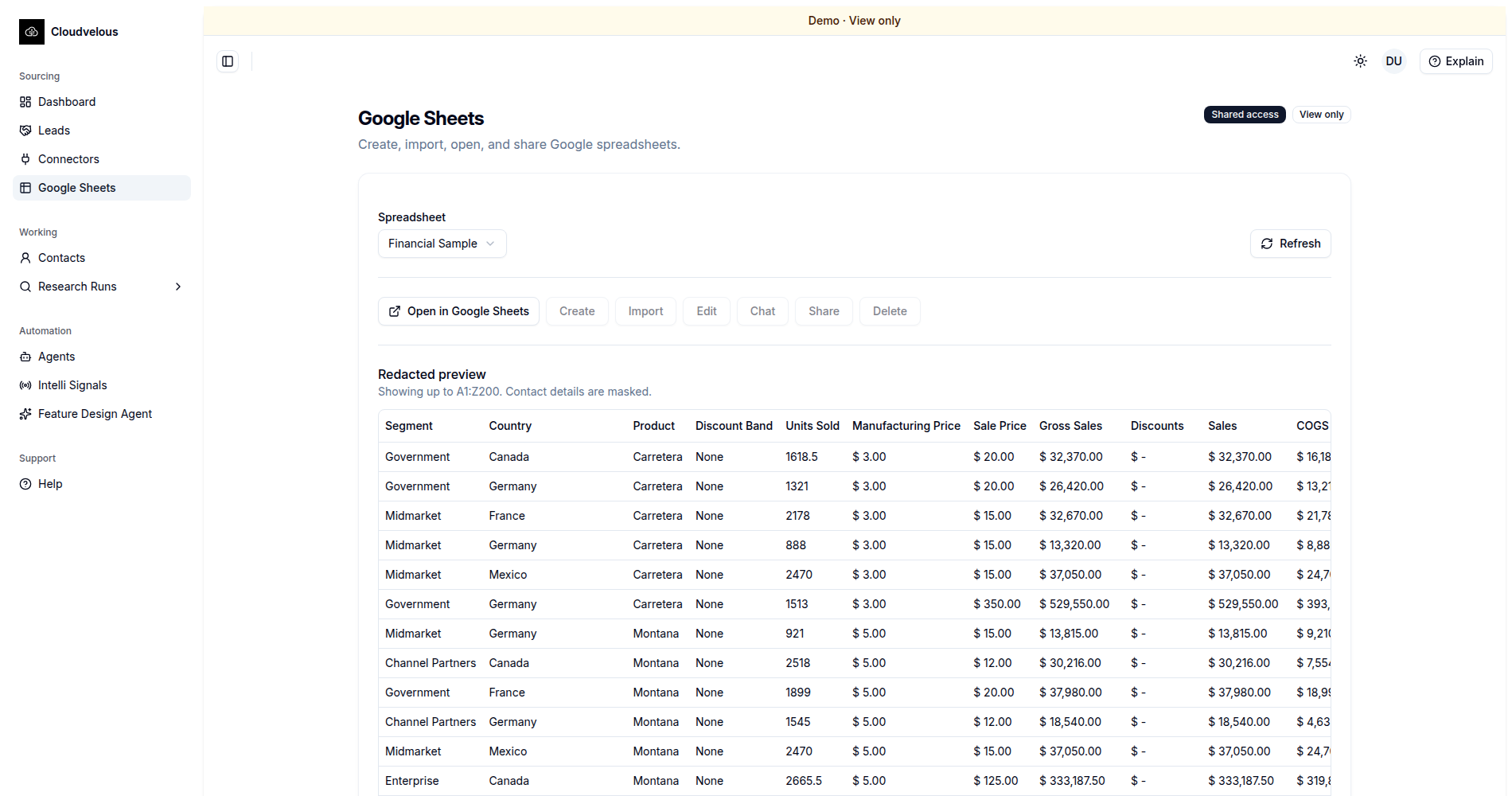
Ask it questions, get grounded answers and charts back
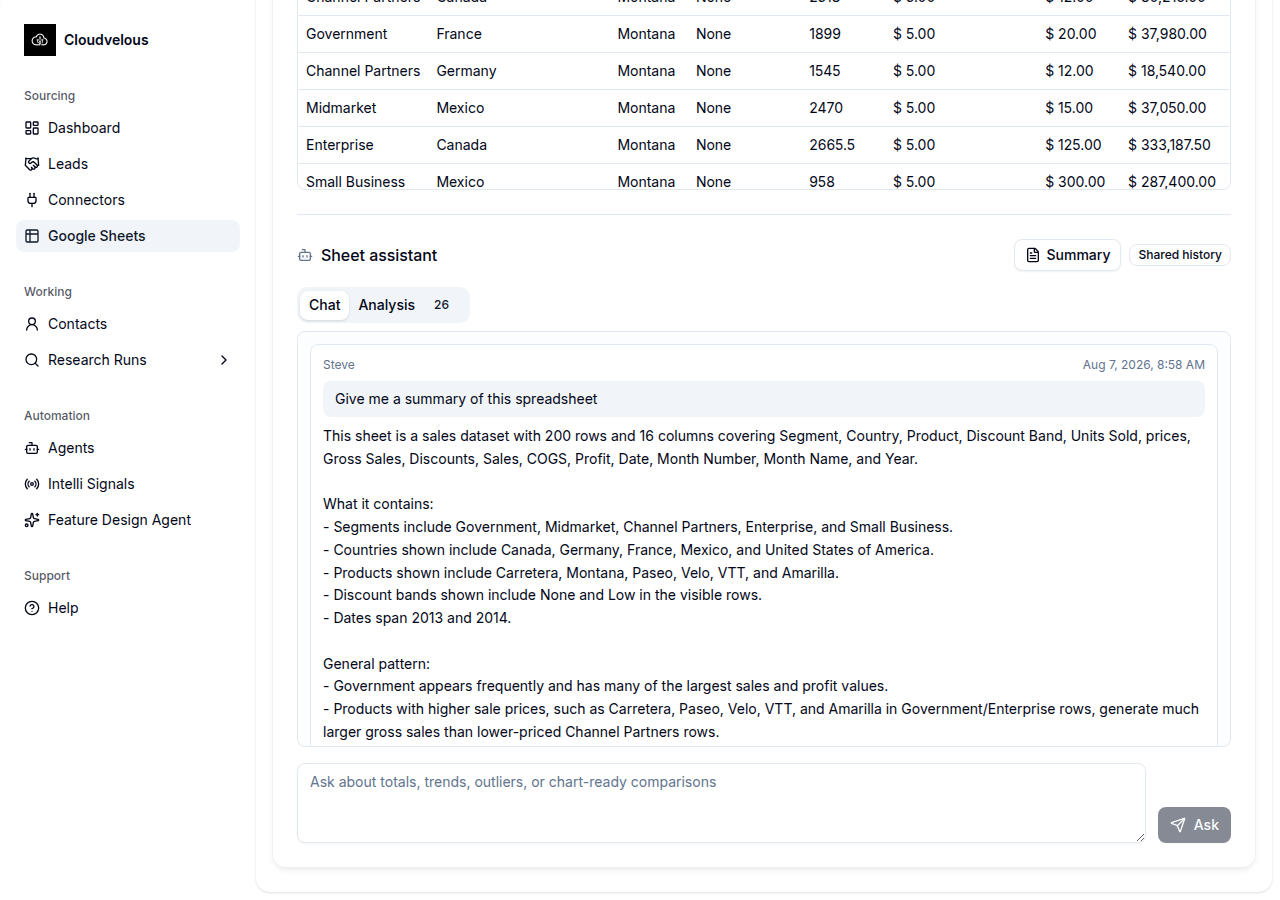
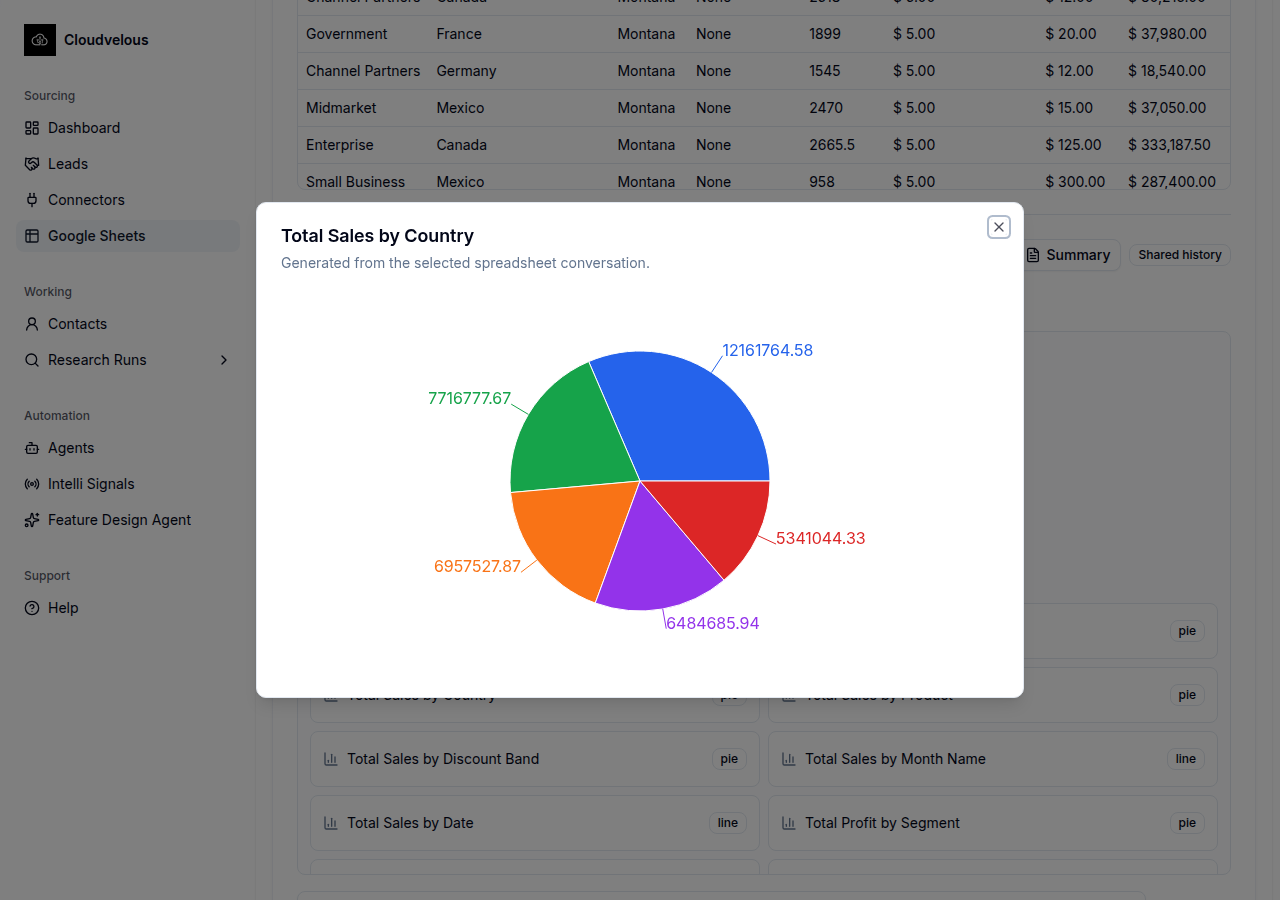
A Sheet assistant sits next to the data with a Chat tab and an Analysis tab. Asking "which country sold the most units" or "what's the highest manufacturing cost" gets answered from the sheet's actual rows, including saying plainly when the data can't answer a question rather than guessing, and a chart (a "Total Sales by Country" pie, for example) can be generated straight out of the conversation and pinned alongside the others. This is the same honesty property the rest of the platform holds to: a wrong answer here would be worse than no answer, so the assistant is built to say "the sheet doesn't contain enough information" instead of inventing one.
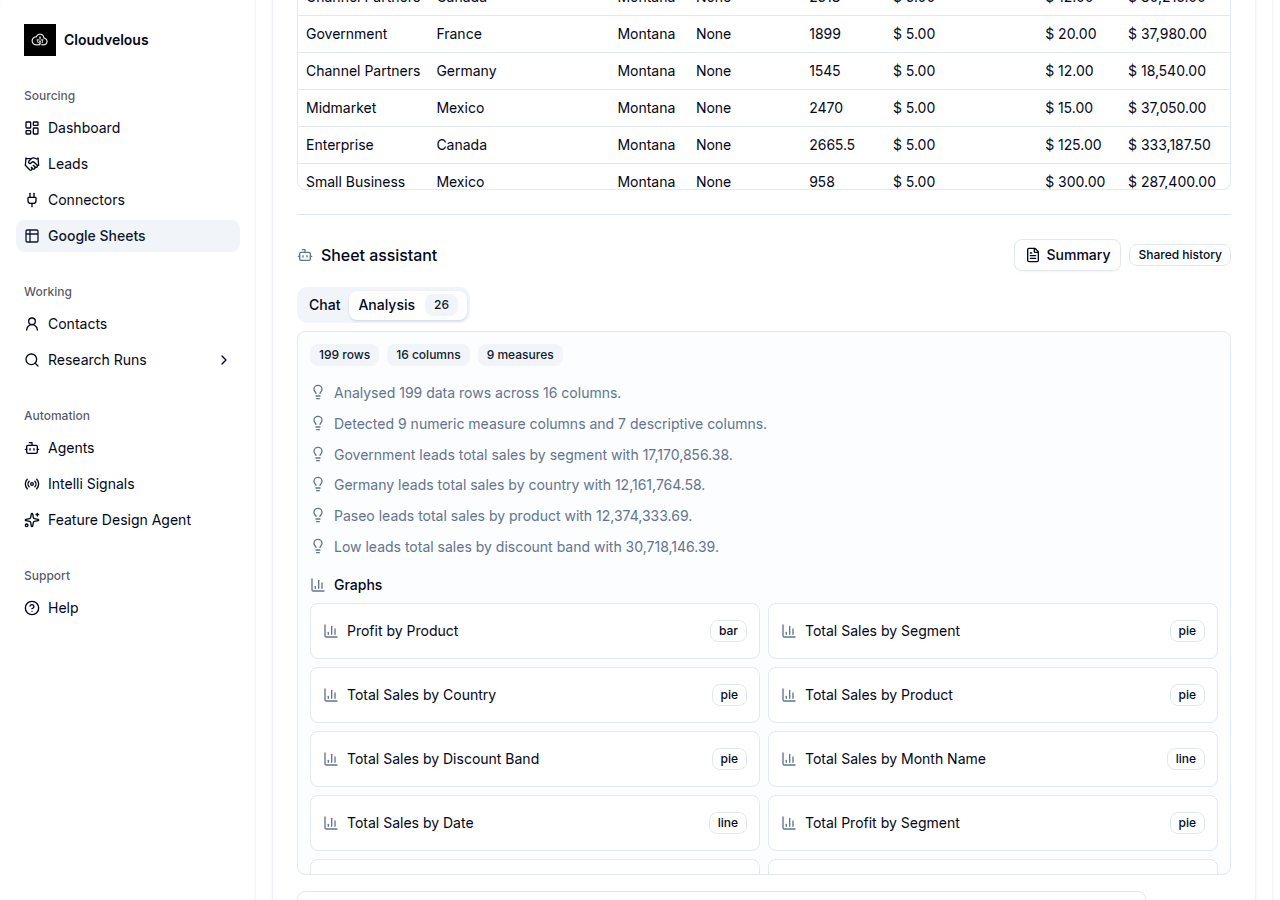
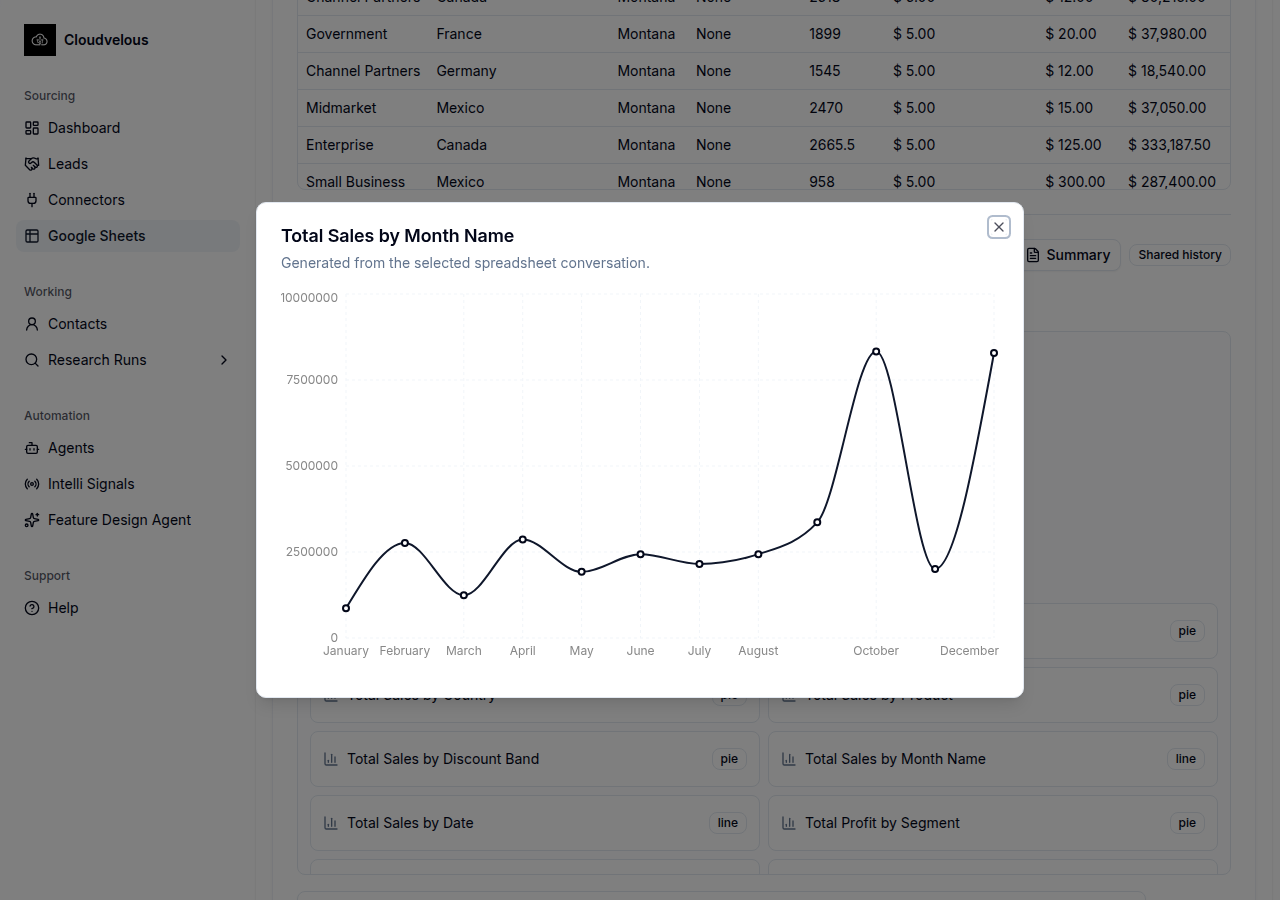
The Analysis tab is the same data, pre-digested: row and column counts, which numeric columns it detected as measures, a handful of auto-generated insights ("Government leads total sales by segment with 17,170,856.38"), and a grid of ready-made graphs across chart types, bar, pie, and line, each one already matched to a sensible chart type for what it's showing rather than defaulting to one chart style for everything.
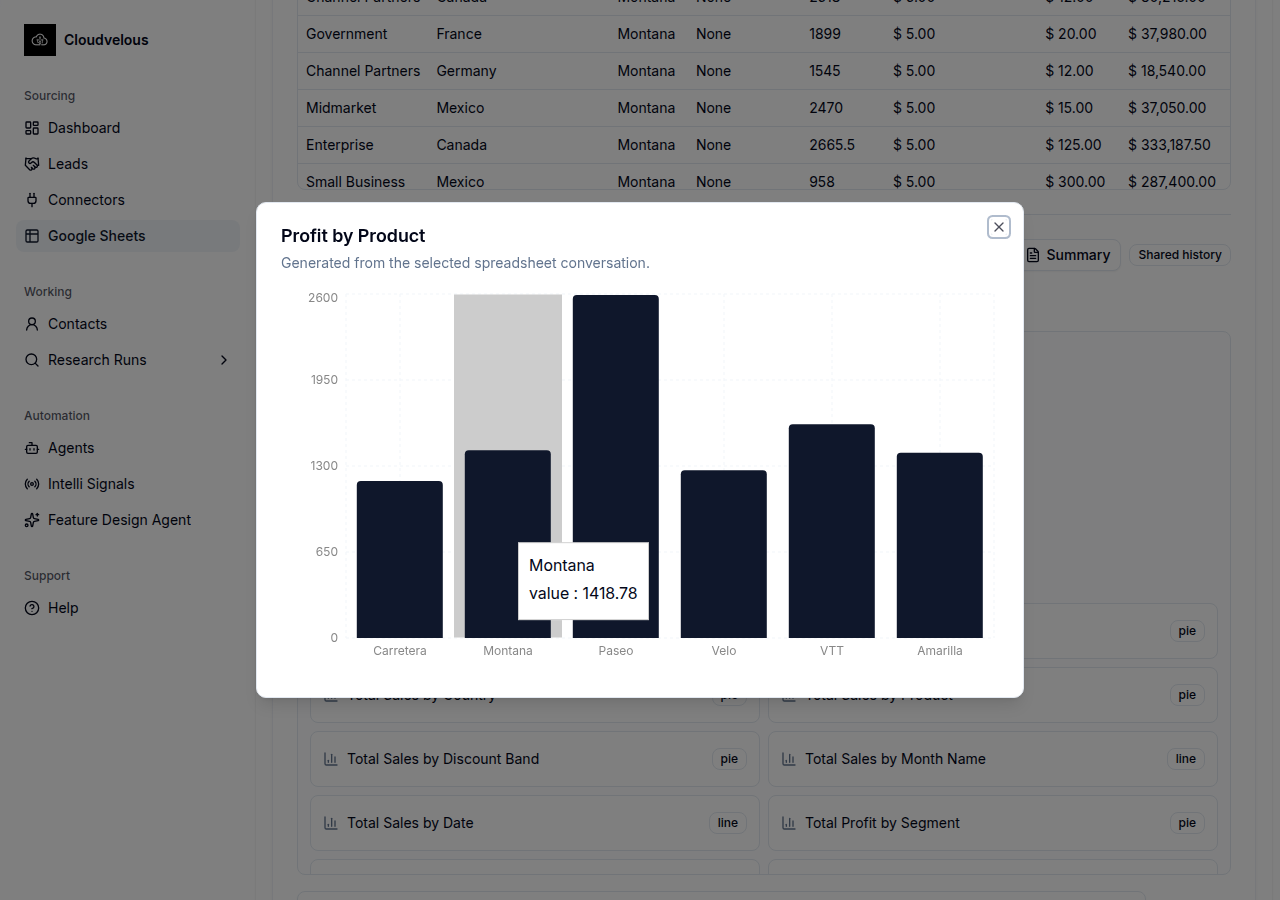
Three of those graphs, opened full-size, show the chart-type matching isn't cosmetic:
The same sheet an agent can act on, not just a person
This is the same Google Sheets connector the inbound lead capture
use case writes to: once a sheet exists here, an agent with a
google_sheets tool assigned can be told, in plain language, to
watch for a certain kind of inbound message and append a row when one arrives,
the same way the Inbound Leads Agent appends a qualified lead. A spreadsheet a
company already trusts becomes something both a person can question
conversationally and an agent can act on automatically, without becoming a
different piece of software to either of them.
Under the hood: an API, an MCP tool contract, and an agent
The Chat and Analysis tabs above are the visible surface of a stack meant to be a working demo of API, MCP, and agent composition, not just a spreadsheet feature. A REST API imports and stores the sheet as governed database rows. A typed MCP (Model Context Protocol) tool contract is the only way the agent is allowed to touch that data. And an LLM agent plans which of those tools to call, in what order, to answer one question or build one report.
The chat side never reads the live sheet and never lets the model do its own
arithmetic on text. Every answer resolves through the same DB snapshot the
import step wrote, and numbers or dates in the final reply pass through a
deterministic enhancer rather than model math, so the agent explains an
answer instead of guessing one. A follow-up like “put that on the
dashboard” routes to publish_dashboard_widget, which
validates the widget shape (metric, bar/pie chart, table, activity feed)
before it goes live.
What the agent is told lives in one place: a dedicated prompt builder holds the system framing, and each MCP tool carries its own description and schema, rather than instructions being scattered across the codebase. That centralisation is what makes the behaviour tunable at all, tightening a tool's wording when the agent keeps picking the wrong one, or steering a class of question toward a different tool. It's also the natural place to log which tool calls a question actually needed, so real usage, not guesswork, drives the next round of tuning.
The MCP server backing this demo exposes 25 tools in total:
- Spreadsheet import & query:
import_sheet,get_sheet_import_status,list_sheet_columns,query_sheet_rows,aggregate_sheet - Dashboards & reporting:
publish_dashboard_widget - Research runs & discovery:
create_research_run,get_research_run,complete_research_run,fail_research_run,start_company_discovery,get_discovery_status,get_discovery_results - Company research & scoring:
get_company_research,request_company_enrichment,get_decision_makers,request_decision_maker_search,save_transport_assessment,calculate_opportunity_score - Call lists & briefs:
publish_call_list,get_call_list,save_call_brief - Targeting & user context:
get_targeting_profile,get_targeting_profiles,get_current_user_selection
Only the first two groups back this spreadsheet demo; the rest are the same server's tools for the outbound research and call-list workflows, exposed through the identical typed contract.
MCP as an access-controlled, self-describing API surface
The interesting engineering problem here isn't the chat UI, it's how an LLM gets to call real API functions without either hard-coding a fixed list of what it's allowed to do or handing it an unscoped API key. MCP solves both: the agent authenticates like any other API client, the server enforces per-tool scope on every call, and the tool list itself is part of the protocol response. The agent discovers what functions it has access to instead of a human maintaining that list in a prompt.
Authentication as an API concern, not a session hack.
/mcp is a bearer-token OAuth endpoint in its own right: a
request carries a token, the server resolves it to a user and an
organisation, and each tool declares the scope it needs (import_sheet
requires sheets:write) before it runs. That's the same boundary
any external MCP client, a teammate's own agent, or a future integration
would need to cross. The sheet assistant in this demo isn't a special
case, it's one more authenticated client of the same contract.
A self-describing function list, with access control behind it.
The agent never gets a raw database connection or a general API key. MCP's
tools/list response hands it the name, description, and JSON
schema for all 25 functions, so the model learns what it can call and with
what arguments from the protocol itself. Nobody hard-codes a
capability list into the prompt, and adding a tool means writing one class,
not editing prose. Discovery and permission are separate steps, though:
every call is still checked against the caller's token scope on
tools/call, so seeing a tool in the list and being allowed to
run it (import_sheet needs sheets:write) are two
different questions, and the server answers the second one every time.
Instructions as a layer, not hard-coded prose. For this demo, the Sheets prompt builder and each tool's description already live apart from the code that calls them, which is the tuning surface described above. The platform proves the fully dynamic version of that same idea elsewhere: agent playbooks are rows in the database, not text baked into a prompt. A person corrects the agent in a normal conversation, an autonomous decision engine turns that correction into a new, versioned playbook, and the next run reads the updated version automatically, with every prior version kept for rollback. No one hand-edits a prompt string; the middleware layer is what gets revised, live, from how the agent actually performed.